How MDI Uses Rooms to Run VR Career Training for People with Disabilities
Summary: MDI has spent 60 years creating jobs for people with disabilities in Minnesota. Now, with VR headsets and ManageXR's Rooms, their team runs hands-on career exploration sessions at events across the state. Next up: the 2026 Special Olympics USA Games, where they plan to bring VR career training to thousands of athletes and fans across three locations. Here's how they do it.
About MDI and Unified Work
Minnesota Diversified Industries (MDI) is a nonprofit manufacturer headquartered in Minneapolis. Since their founding in the 1960s, their mission has been to provide employment for people with disabilities.
Today, 56% of MDI's workforce identifies as having a disability. The organization produces corrugated plastic packaging and runs assembly operations for businesses across the country, from small companies to Fortune 500 clients.
"This is not a sheltered work group," said Eric Black, MDI's CEO. "These are people who are participating in a vibrant employment opportunity that allows them to do meaningful work."
About five years ago, MDI hired Black as CEO. He brought a personal interest in how VR could support people with disabilities and started a task force to explore this idea further. Ryan Anderson, MDI's Workforce Development Manager, joined shortly after and also joined the task force.
Anderson said, "[Black] had a bit of a passion for virtual reality himself and saw the possibilities within that technology for people with disabilities."
The team started small. They created their own 360 video content and tested it with Google Cardboard headsets. The low cost made it easy to scale, but the content quality wasn't there.
"We were pretty far behind in terms of the development pathway," Anderson said. "We knew we wouldn't ever be able to fully scale the content side if we were keeping it in-house."
Then, Anderson discovered Transfr, a workforce education company building VR career exploration and training simulations. It became the clear solution for quality VR content that they could scale. MDI now manages 46 active VR headsets through ManageXR.
Unified Work: Building a Pathway to Employment
In 2017, MDI launched Unified Work, its external-facing workforce development program. Unified Work provides free career skills training to people with disabilities and others facing barriers to employment. That includes formerly incarcerated individuals, women exiting domestic violence, and teenagers exploring career paths. Since 2023, over 640 people have participated in the program.
VR career exploration through Transfr is a core piece of the program. Participants put on a headset and can try out more than 50 career simulations across manufacturing, healthcare, construction, agriculture, and logistics.
Why does VR work so well for this population? Anderson borrowed a phrase from Transfr: you can't be what you can't see.
"For folks with disabilities, it can be harder for them to access quality learning experiences.," Anderson said. "We're trying to expand the imaginations of what's possible for them and get them to think bigger about their career possibilities."
The results show up in small, powerful moments. One of MDI's VR partners had a participant try the diesel technician simulation. He enjoyed it so much that he decided to pursue a career in that field.
"I think that was really cool to hear," Delaney Zuniga, MDI's primary VR operations lead, said. "It just opened the door for somebody."
Anderson shared another example: a friend of his teaches special education in St. Paul public schools. He uses the VR headsets with students who have a harder time succeeding in school.
"They're exploring tons of careers. The students are having their eyes opened to new possibilities, but in a super cool, engaging way," Anderson said. "For a lot of students, they have external limits placed on them for one reason or another. And this is breaking down some of those limits and exposing them, maybe for the first time, to the fact that there's a big world out there with lots of opportunities."
The Challenge: Running VR Sessions Before Rooms
MDI brings headsets to events, conferences, and community gatherings across Minnesota, and soon beyond. Delaney Zuniga handles the on-the-ground VR operations.
Before Rooms, MDI used two casting methods to monitor what participants were doing in-headset as well as guide them through: USB screencasting and an in-headset initiated casting. However, both methods caused friction with their deployment setup.
"With the USB tool, I found myself having to run back and forth and troubleshoot and check in with people more often," Zuniga said. "Sometimes I would have to have the user step out of the headset so I can get in and fix whatever is going wrong."
With device casting, she had to go back into the headset, generate a new code, and type it in. How much time did troubleshooting actually eat up? Delaney estimated about 10 minutes per hour-long session.
"I think it just eats up a lot of time in the grand scheme of things," she said.
How Rooms Changed Their Workflow
Zuniga has now used Rooms at five events and counting.
The setup process is fast. She creates a Room in ManageXR, adds the headsets she's bringing to the event, and hits start. The headsets connect automatically and launch the assigned app.
"It's a much faster setup process," Zuniga said. "Just adding whatever headsets I'm bringing with me to an event into the room and then just hitting ‘start room’. That's all I have to do."
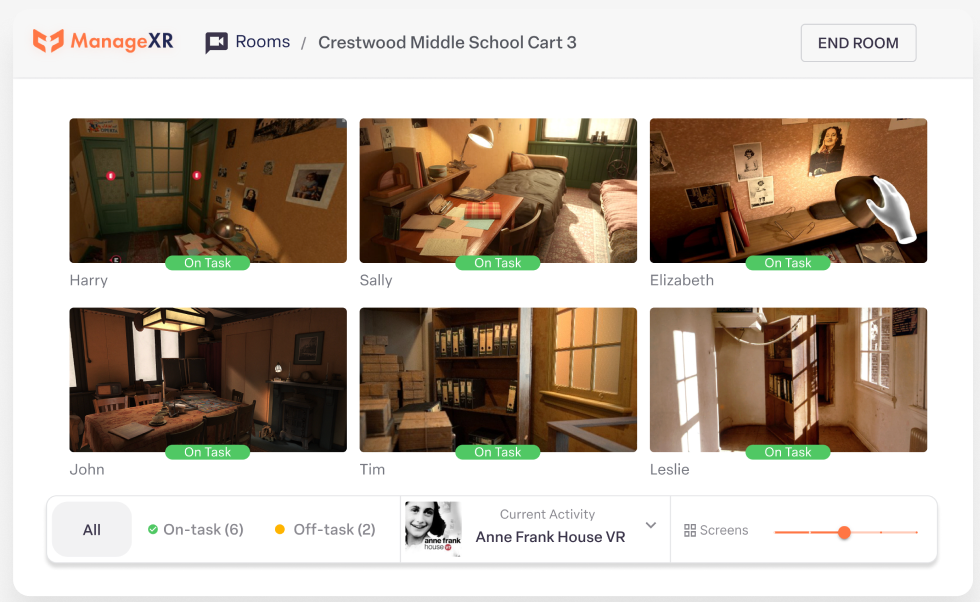
She monitors the session from her laptop connected to a larger monitor, or from a tablet. Both work the same way. She can see every participant's screen from one central spot.
With Rooms, these are the features she relies on most:
- Real-time screen viewing across all headsets in one dashboard
- Launching a specific app to all headsets the moment the Room starts
- Relaunching the app with one click if a participant exits or if it gets buggy
- Remote volume, brightness, and headset restart controls
- Battery and controller battery monitoring with alerts
"Being able to facilitate sessions with multiple headsets is a lot easier now," Zuniga said. "I save a lot of time from having to individually cast each headset to be able to see a live feed."
There's a practical perk she didn't expect: packing less gear. The old USB casting workflow required extra cables and equipment. With Rooms, she just brings the headsets and her laptop or tablet.
"I have to pack so much less now, and I save a lot of space that way," Zuniga said.
The team noticed the stability improvement too. The casting connection drops less often with Rooms, and reconnecting is simple.
"Even when I'm just casting one headset at a time, I still find myself using Rooms just because of the convenience of just hitting start and it loads up," she said. "And I just love having the device controls there if I need them."
Rooms in Action
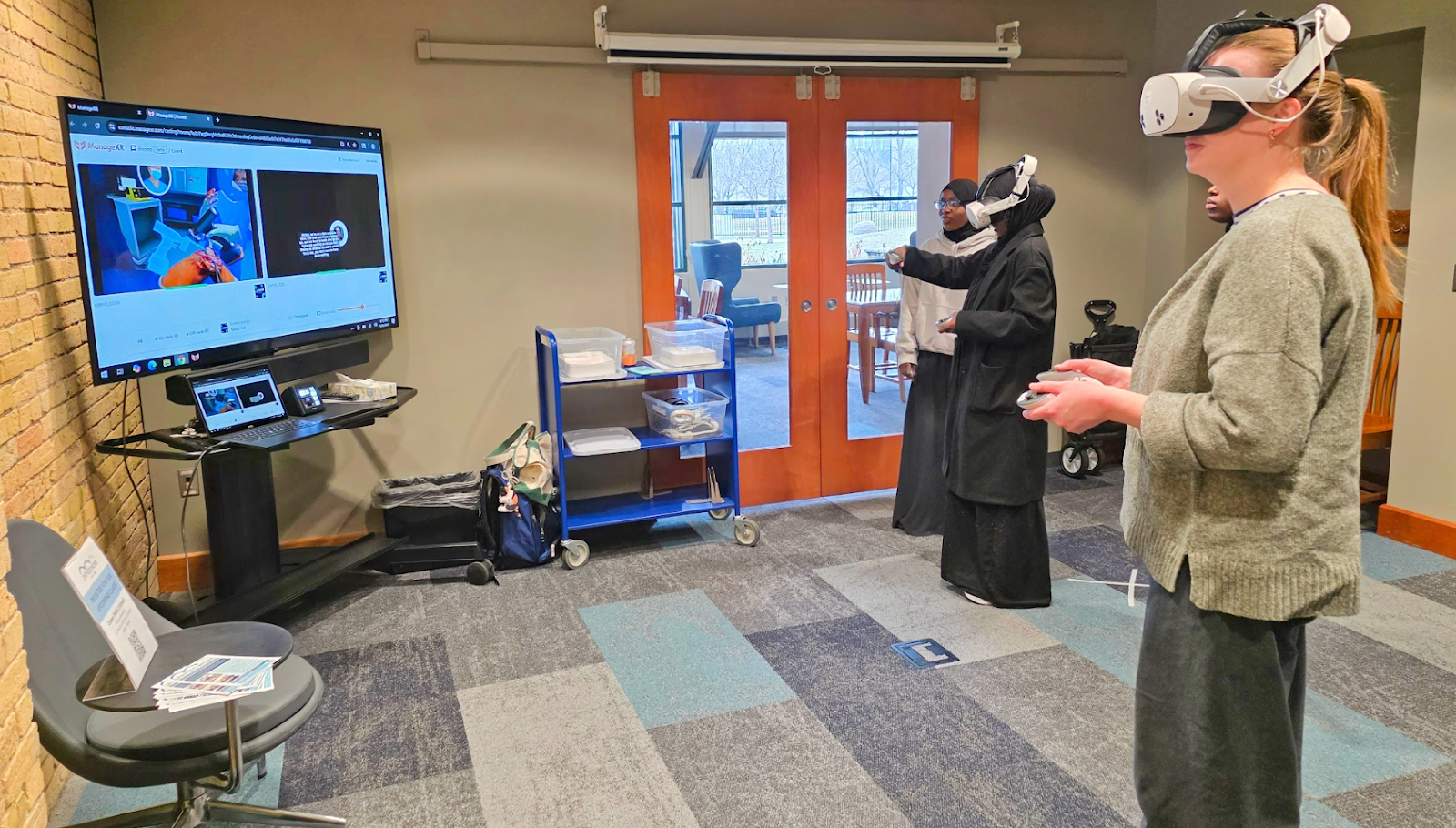
Last week, Zuniga ran a VR event at a local library. The library had one monitor in the room. She brought two headsets.
Before Rooms, this setup would have been a problem. She could cast only one headset at a time to the monitor. The other participant would be invisible to her and to the audience.
With Rooms, she cast both streams to the single monitor. She could see what was happening in both headsets at a glance. People standing around the room could watch both participants at the same time.
When one participant mentioned they couldn't hear the audio, Zuniga simply turned up the volume from the dashboard with a single click.
Taking VR to the Special Olympics USA Games
As for what’s next for MDI and their VR program, the team is headed to the 2026 Special Olympics USA Games in June, 2026. The Games will bring together 3,000 athletes, 1,500 coaches, 10,000 volunteers, and 75,000 fans from all 50 states. MDI plans to run VR career training activations at three locations during the Games:
- Fan Fest at the University of Minnesota campus, with roughly three VR stations
- Athletes Village in the campus dorms, an athlete-only space, with two or three VR stations
- The Mall of America in Bloomington, with a VR station as part of MDI's Fan Zone
Rooms will be central to managing this scale. The team will work with participants who have varying levels of VR ability. Remote controls for relaunching apps and restarting headsets will reduce the need to take headsets off participants' heads to troubleshoot.
Why MDI chooses ManageXR for device management
MDI manages its VR devices on ManageXR. Anderson says, "The power of ManageXR and the flexibility that gave us was something that we needed for our whole fleet.”
The team also trusts ManageXR's support with time-sensitive issues. Zuniga uses the in-app chat regularly and gets quick responses. "Every time I've had an issue I need help troubleshooting with, ManageXR is so responsive and on it," Zuniga said. "It feels like they actually care about solving whatever issue I might have."
Get Started with Rooms
Rooms gives facilitators a simple way to lead VR sessions. View all participant screens in one dashboard. Launch activities to every headset at once. Keep your sessions running smoothly.
Try Rooms with ManageXR for free today or book a meeting with our team to learn how Rooms can support your VR program.