Android XR Is Here, Starting With Samsung Galaxy XR. Manage Android XR Devices with ManageXR.
Google is bringing Android Enterprise to Android XR, its operating system for XR devices. This means you can now access robust deployment, management, and security tools on the Android XR platform, starting with Samsung’s Galaxy XR headset.
ManageXR is proud to announce official support for Android XR devices, beginning with Galaxy XR. As an approved Android Enterprise Mobility Management (EMM) partner, ManageXR is ready to help IT teams and XR program managers deploy, manage, and scale Android XR devices from day one.
A new chapter for XR device management
The XR industry has always been full of exciting applications, but also fragmentation. Over the past several years, innovative XR hardware has emerged from manufacturers around the world, each running its own operating system, app ecosystem, and management process. For organizations trying to scale an XR program, that fragmentation creates real challenges.
For example, your XR program might rely on an app that works for your Meta Quest devices, but doesn’t work on PICO, making it difficult to switch between hardware. The device experience varies between different hardware types as well, making it difficult to guide users through an XR experience. The same controller buttons do different things, menus look slightly different, and what users can control changes from one operating system to another.
The lack of standardization also leads to vendor lock. For instance, if you have built your entire XR program around Meta devices, with apps that rely on Quest hardware and IT processes that only use Horizon managed services, it becomes much harder to bring in non-Meta hardware.
Android XR changes that.
With XR devices now built on Android XR and managed through Android Enterprise, IT teams can manage their Android XR fleet with the same ease and familiarity they have with existing Android devices.
Android XR also brings a common foundation that device manufacturers, developers, and enterprises can build on together. The result is a more standardized XR ecosystem which allows for more freedom across different hardware choices. Now, switching from a Samsung Galaxy XR device that's built on Android XR to another device that's running on Android XR will be much easier from both a user experience and device management perspective.
The expansion of Android Enterprise to Android XR brings the trusted security and management framework IT professionals rely on for millions of Android devices to the new era of spatial computing, starting with Samsung Galaxy XR. This standardized foundation is what organizations need to confidently secure, and scale XR deployments.
- David Still, VP, Product & Engineering, Android Enterprise
What Android XR brings to the table
Android Enterprise is expanding to Android XR, enabling you to use an approved Enterprise Mobility Management (EMM) partner, such as ManageXR, to manage Android XR devices. Access management features that enterprise and education teams depend on:
- Android Zero-Touch Enrollment: provision devices out of the box, at scale, without manual setup
- Managed Google Play: distribute and manage Google Play apps
- Lock Task Mode: lock devices down to approved apps and experiences
Why choose ManageXR to manage Android XR devices
As a specialized XR device management software, ManageXR understands the challenges of growing your XR program. Successful XR programs require comprehensive oversight to ensure devices behave exactly as you need them to. ManageXR already powers some of the largest VR deployments in the world across Meta, PICO, and other hardware. Now, those same management capabilities extend to Android XR devices.
Here's what that looks like in practice:
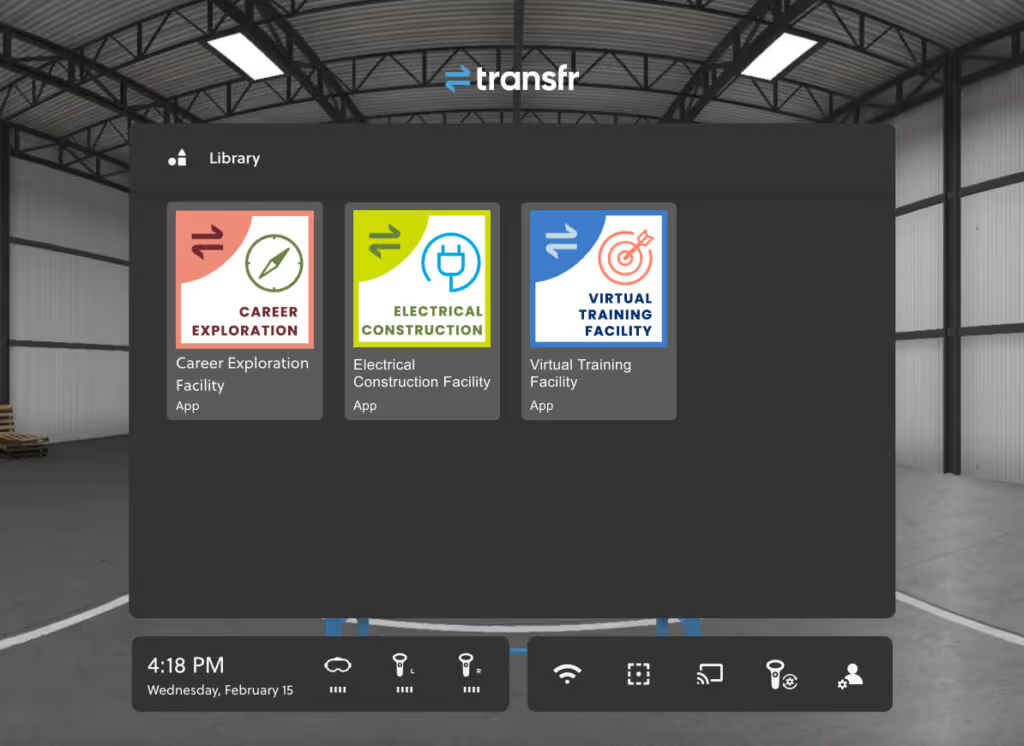
Transfr: Transfr provides young adults with career exploration simulations through VR. They rely on ManageXR's Custom Home Screen to give first-time VR users a frictionless, branded entry point into their workforce training simulations. When students (many of whom have never used VR before) put on a headset, they land on a clean, familiar interface that places them into the content as soon as possible.
Maria College: Maria College’s nursing training program scaled from 30 to more than 150 VR headsets with ManageXR. Faculty can remotely launch apps across dozens of devices simultaneously, placing every student into the correct simulation at the same time. When technical issues arise, ManageXR flags errors and reports device activity so IT can quickly identify and resolve problems without ever putting on a headset.
Prisms: Prisms deploys immersive math and science modules to thousands of devices nationwide. ManageXR's analytics capabilities allow Prisms to understand their devices’ health, content usage, and location data, so they can confidently scale their fleet across hundreds of schools.
ManageXR gives you the tools to manage your fleet with confidence:
- Bundle device settings and content with configurations, and bulk-deploy to your devices remotely
- Remotely command devices to launch apps, adjust volume and brightness, power off, and more
- Create a custom Home Screen environment with your branding for users to easily navigate to approved XR content
- Track your program's success with device analytics to understand when your devices are active and what content is most popular
- Use Rooms (Beta) to view all device screens, remotely launch users into apps and XR experiences, and get real-time alerts when users have issues
If you already have devices on ManageXR and are considering adding Galaxy XR or another Android XR device, you can manage them just as you would any other device on ManageXR.
Get started with Android XR and Galaxy XR
The Samsung Galaxy XR is the first device to use the Android XR operating system. Soon, we’ll see more hardware manufacturers and app developers build with Android XR. That means more device options and more content for education and enterprise deployments.
ManageXR is committed to ensuring our customers are the first to take advantage of every device and capability Android XR has to offer.
Ready to deploy Android XR devices? Start a free trial to manage Android XR devices today, or chat with our team to learn more about managing Android XR devices with ManageXR.
New to ManageXR? Use our Get Started with ManageXR guide to learn how to use our most popular and powerful device management tools.
Frequently Asked Questions
What is Android XR? An extension of the Android platform to extended reality (XR) devices, Android XR is an operating system for XR. With Android Enterprise (Google’s platform for managing Android devices) coming to Android XR, you can now access enterprise-grade management, security, and app distribution tools to headsets and spatial computing hardware. The Samsung Galaxy XR is the first device to launch on Android XR.
Is ManageXR an official Android XR MDM partner? Yes. ManageXR is recognized by Google as a validated Android Enterprise Mobility Management (EMM) partner for Android XR, meaning our platform is fully equipped to manage Android XR devices from day one. Unlike most other device management softwares, ManageXR is specialized in XR device management. You can manage Android XR devices, as well as other popular XR devices such as Meta and PICO, all within ManageXR.
How do I manage Android XR devices in ManageXR? Android XR devices are managed through the same ManageXR workflows you already use. Android Zero-Touch Enrollment also allows you to provision devices at scale without manual setup. Follow this guide to enroll Android XR devices in ManageXR.
Can I use ManageXR's Restricted Kiosk mode on Android XR devices? Yes. You can kiosk a single app or XR experience on Android XR devices. Android XR enables the same locked-down, focused device experience that ManageXR customers already use with other XR devices.
What Android XR devices does ManageXR support? ManageXR currently supports the Samsung Galaxy XR, the first device to launch on Android XR. As new Android XR hardware comes to market, ManageXR will expand support accordingly.
What makes Android XR different from other XR platforms? Unlike proprietary XR operating systems, Android XR is built on the Android platform—the same foundation used by billions of mobile devices worldwide. This means organizations can manage XR devices with familiar tools, familiar workflows, and existing IT infrastructure, dramatically reducing the complexity of scaling an XR program.
How do I get started managing Android XR devices with ManageXR? If you aren’t already using ManageXR, you can start a free trial or chat with our team to learn how ManageXR can support your Android XR program. If you have questions about adding Android XR devices to your ManageXR organization, contact support at support@managexr.com.