
How we created a tool that increased VR usage by 3x
We talk to customers a lot at ManageXR. Between sales demos, onboarding calls, or technical troubleshooting with the engineer on-call, almost every department at ManageXR is customer-facing.
These conversations are our most valuable resource. We get to learn how organizations are really using VR day-to-day and the issues that even successful VR programs are running into.
For those using VR in the classroom or for training sessions, we kept hearing the same thing: leading a group of headsets still has its challenges. You need to know what's happening inside every headset, see who's engaged, keep everyone on the same activity, and step in the moment someone needs help, all without walking from headset to headset.
That's exactly what Rooms is built for. From a single dashboard, you can view and manage up to 30 VR headsets at once, launch your entire group into the same activity, and keep every participant in sync.
We launched Rooms in private beta. From February through April, 55 organizations used Rooms, starting more than 400 Rooms across 1,300+ headsets. Their feedback directly shaped the improvements below.
Streaming that’s twice as reliable
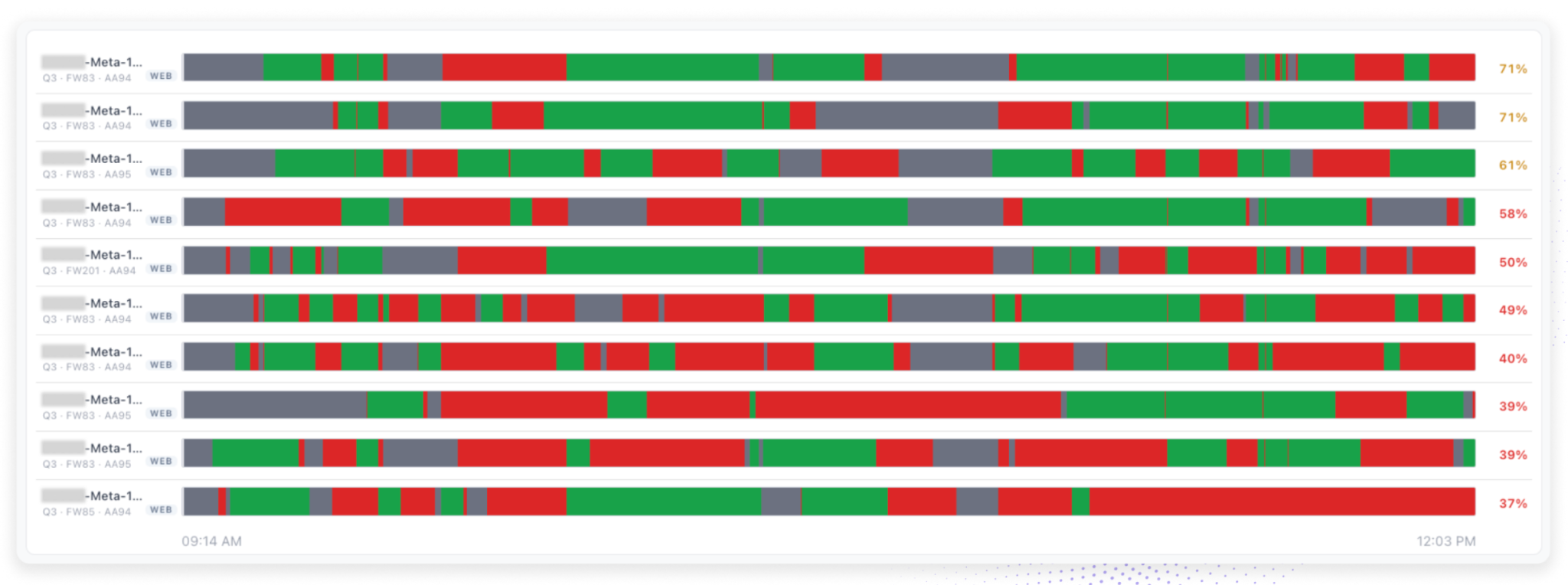
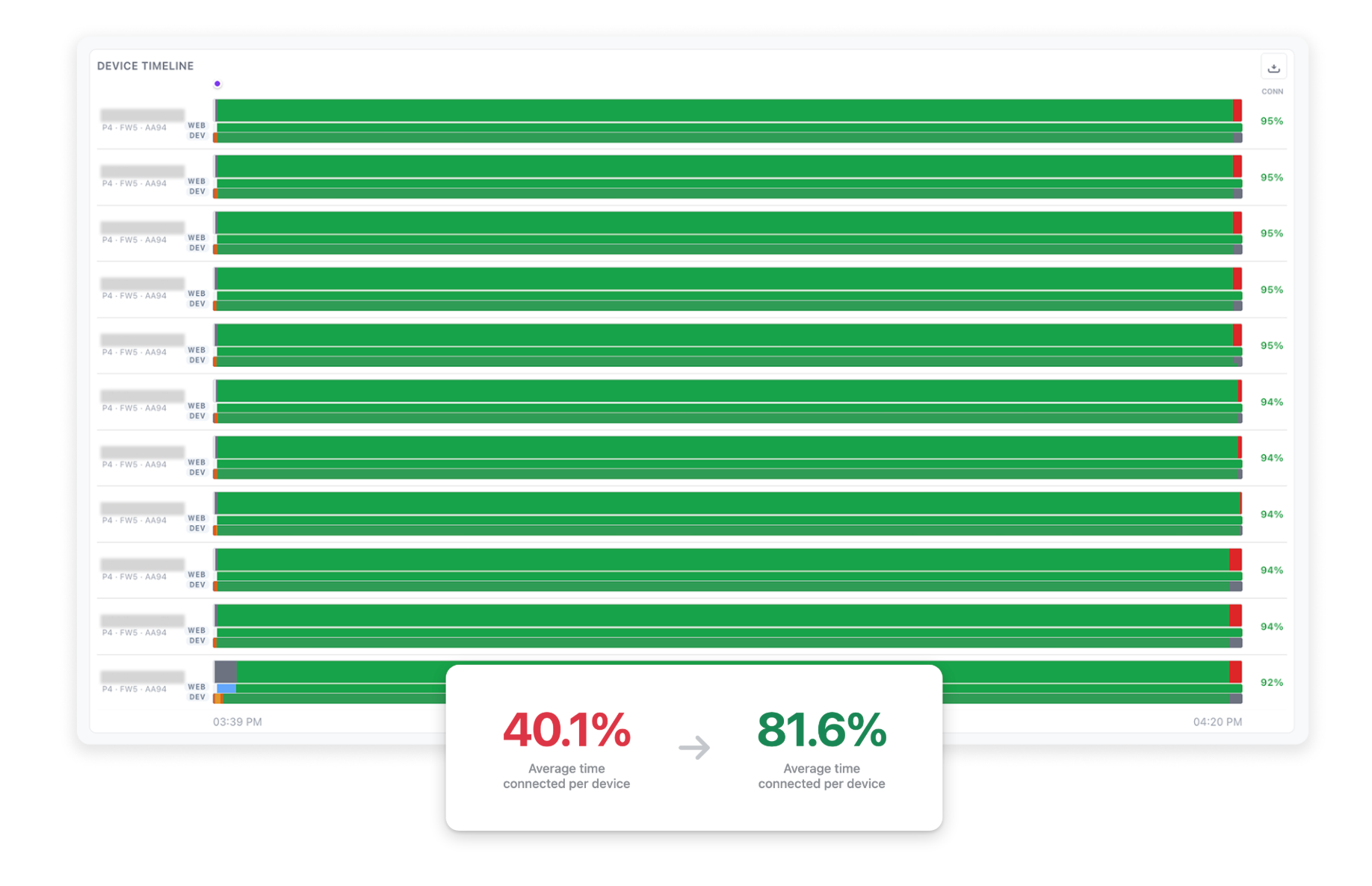
Reliable streaming is the foundation of Rooms. When you open a Room, you need every participant’s screen to appear immediately and stay live for the entire session. Delivering this consistently is challenging, because streaming depends on several factors: the headset’s firmware, the device model, and the local network conditions. Early in the beta, this reliability varied. Some facilitators ran flawless sessions while others experienced frequent drop-offs, with devices streaming only about 40% of the time on average.
To address this, we identified and resolved the root causes of unreliable streaming, including Meta firmware bugs, manufacturer-specific casting restrictions, in-headset prompts that interrupt streaming, and connections that failed to recover after a network blip or device restart. As a result, devices now stay connected and streaming 81.6% of the time on average, twice as reliable as at the start of the beta.
A network test built for IT
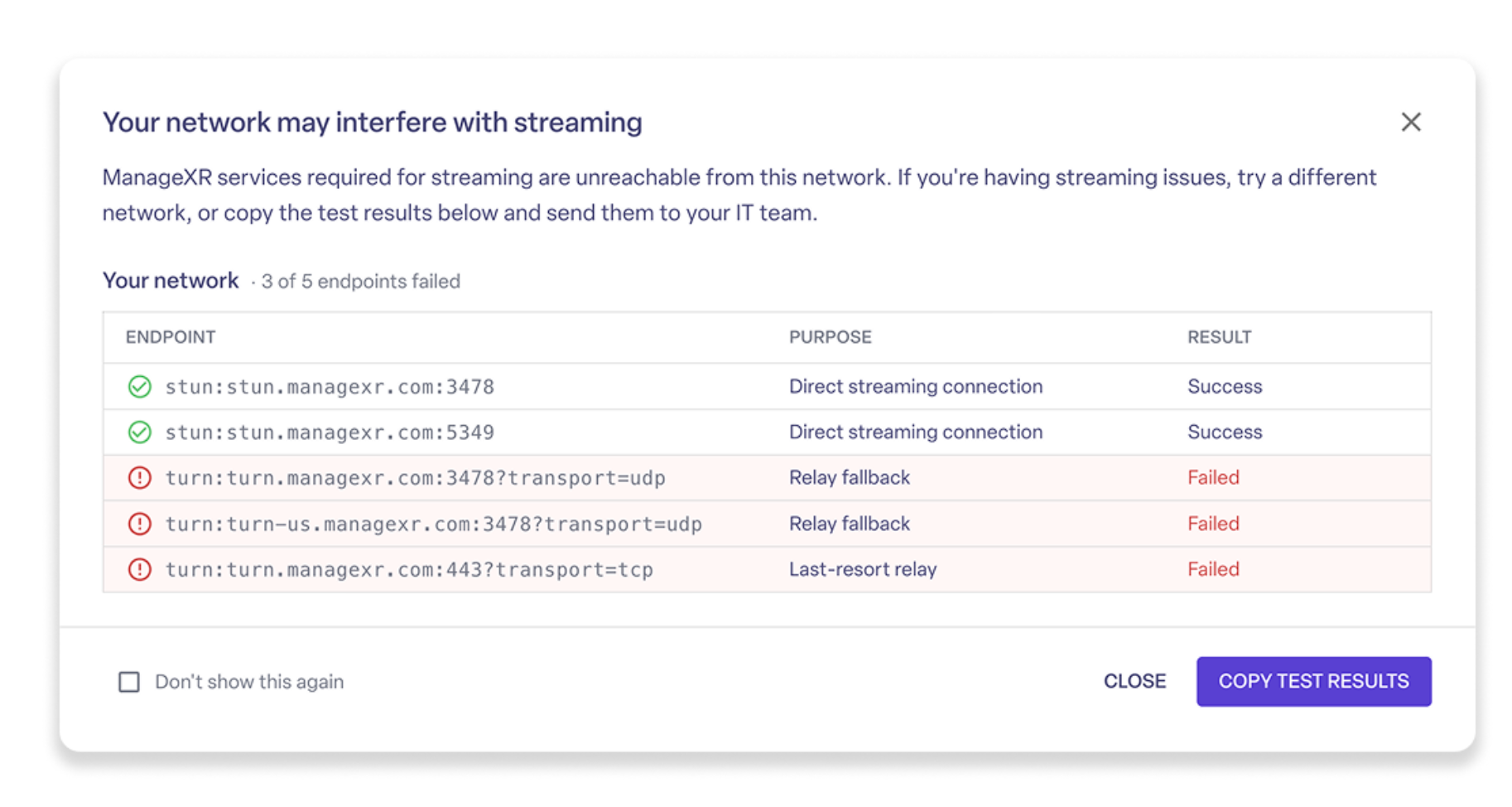
An early signup for the Beta tried using Rooms three times but could never get a device to connect. We had an engineer hop on a call to troubleshoot and found the culprit: blocked endpoints.
Even with reliable streaming, a restrictive network can prevent Rooms from working. Many school and corporate networks block the services that streaming depends on, and unblocking them requires giving IT the exact list of services to allow. Without that information, getting devices connected can be difficult. As one K-12 instructional facilitator told us, “I’ve only added 1 in 50 devices. It’s been hell getting past firewalls.”
ManageXR’s built-in network test removes the guesswork. It checks the specific services that streaming depends on, identifies anything your network is blocking, and generates a report you can share directly with your IT team. With a clear list of what to allow, your IT team can prepare the network before your session begins.
Share a Room like a Google Doc
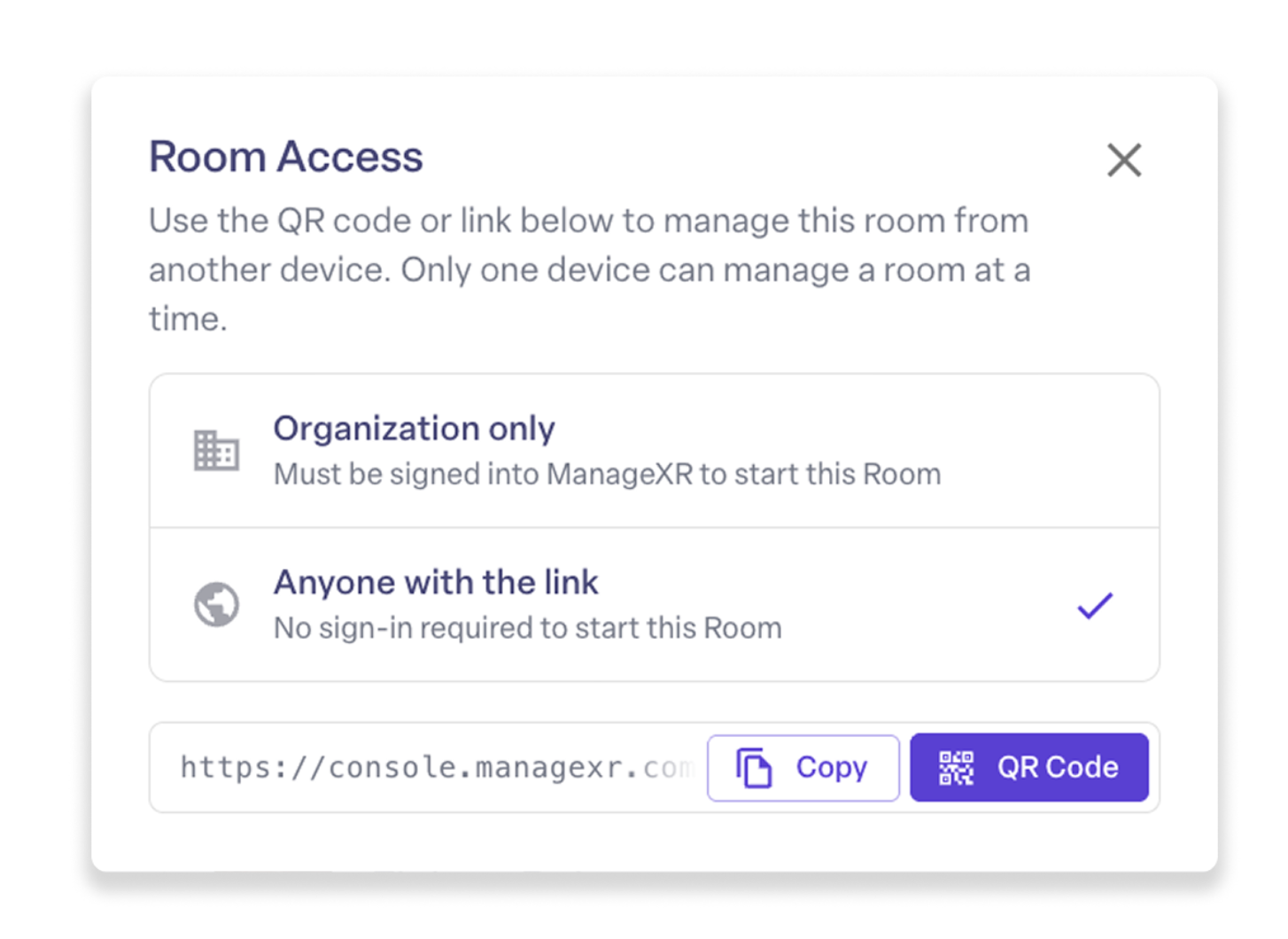
Beta users also told us that starting a Room should be more flexible. Admins wanted to give teachers direct access without onboarding them to the full ManageXR console, and facilitators wanted to launch a Room directly from a tablet. As one college IT administrator explained, “A link so our teachers wouldn’t need an account would really come in handy.”
Now you can share a Room as easily as you’d share a Google Doc. Generate a public link that lets anyone start the Room without an account, turn that link into a QR code to launch from a tablet, or keep access restricted to your organization. Facilitators get a simple way in, while admins retain control over who can access each Room.
Help individual learners without interrupting the group
During a live session, individual participants will inevitably need help: their volume may be too low, an app may freeze, or they may move into the wrong activity. Previously, the only way to resolve these issues was to physically pick up each headset, which took your attention away from the rest of the group. Delaney frequently had to adjust the volume on individual devices, and another facilitator told us they regularly restarted headsets to clear frozen apps.
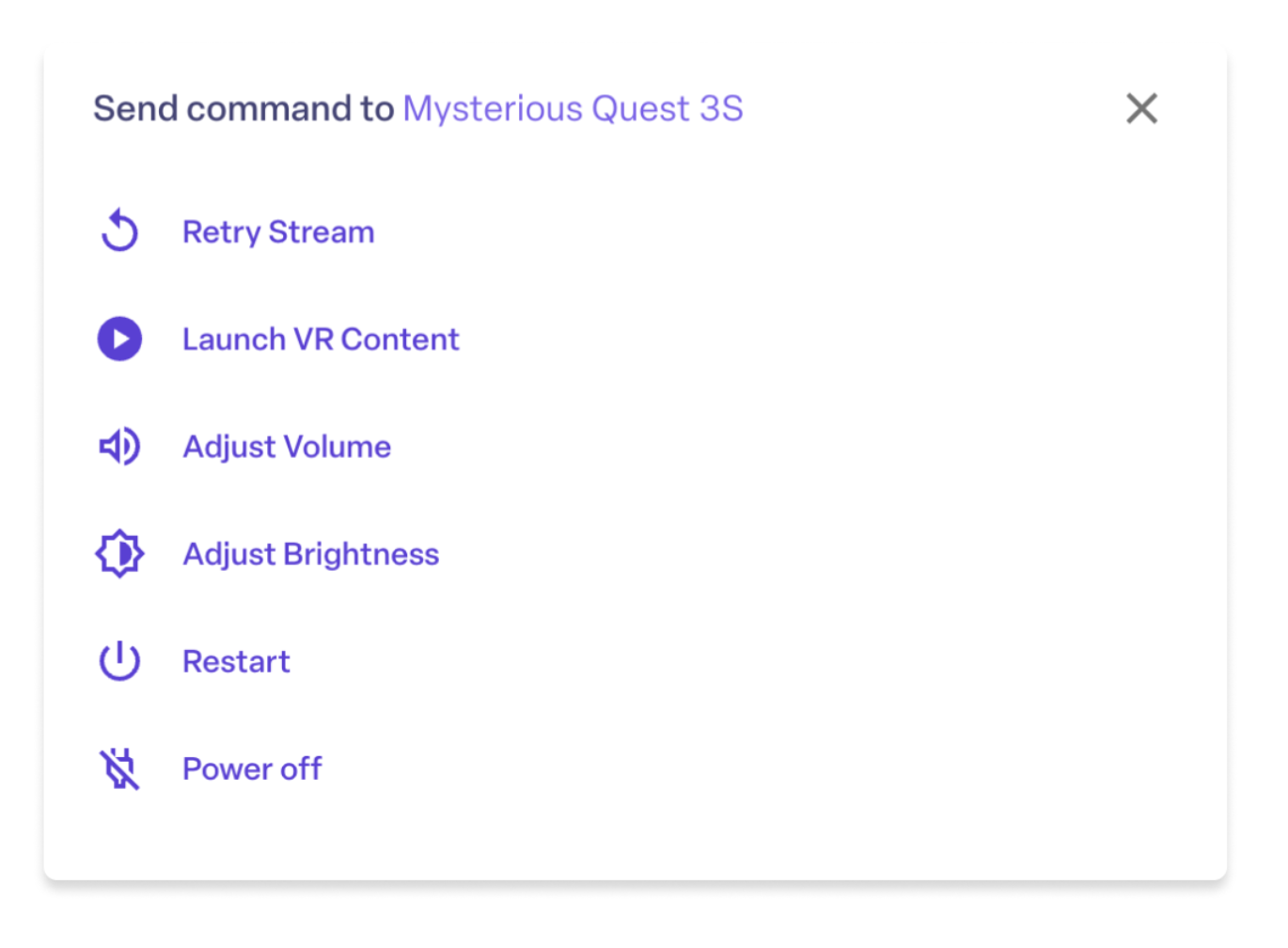
Now you can manage individual devices directly from your screen. The individual command palette gives you one-click access to the essentials: retry a stream, launch content, adjust volume or brightness, restart an app, power off the device, or move a single participant to a different activity if they get ahead of the group. You can resolve issues for any participant without ever picking up their headset.
Trusted by educators and trainers
Rooms is already changing how educators and trainers run their VR sessions. Here are a few examples from our private beta.
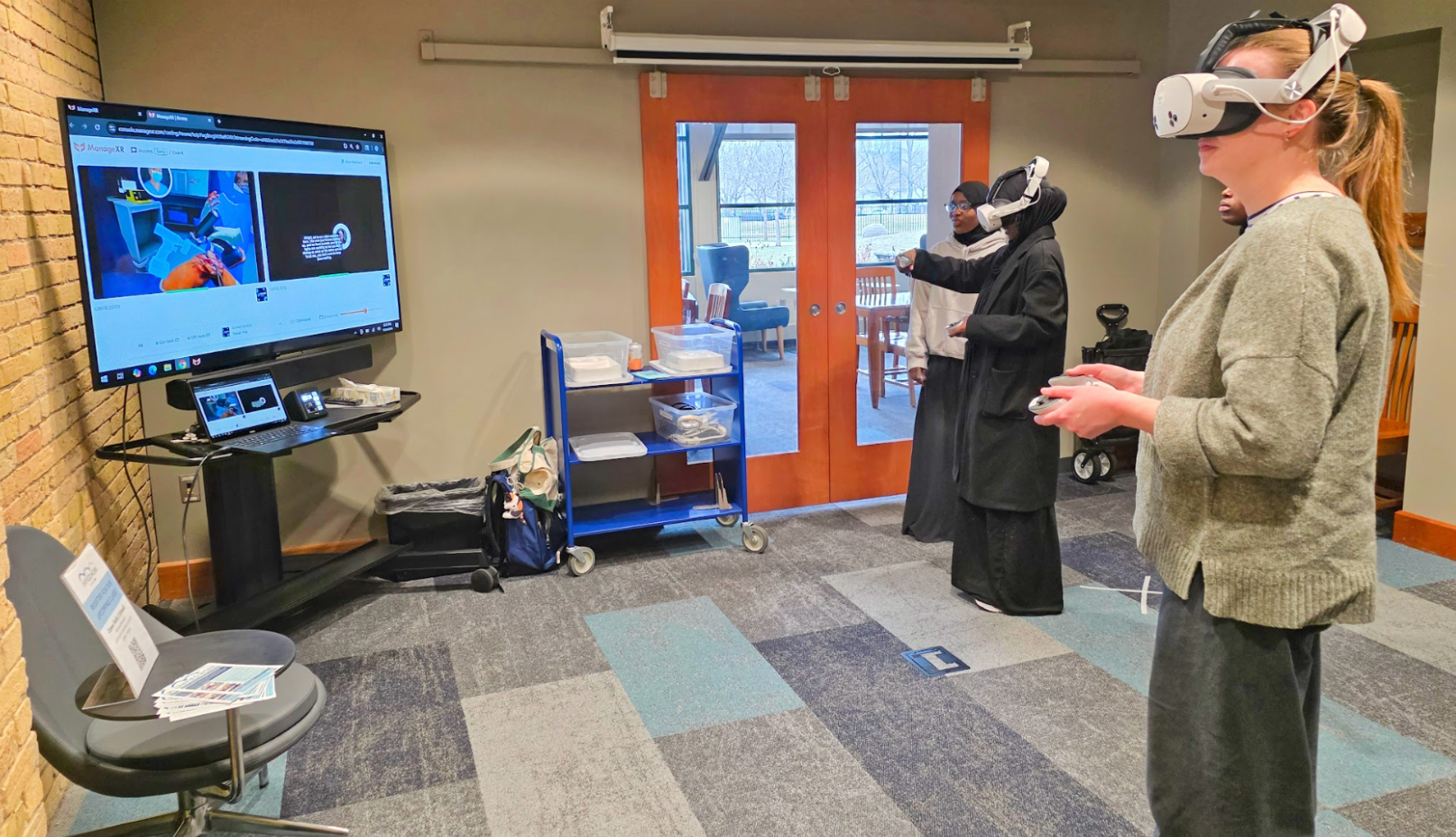
Take Minnesota Diversified Industries (MDI), a nonprofit that helps people with disabilities explore new career paths through immersive experiences. Groups of learners take turns going through a simulation while others watch a live mirror of the headset screen. Before Rooms, VR operations lead Delaney Zuniga told us, unreliable casting made sessions hard to run: “I found myself having to run back and forth and troubleshoot and check in with people.” She often had to borrow headsets from participants to fix issues, cutting into valuable session time.
Other educators and trainers shared similar feedback during the beta:
“The ability to instantly deploy Rooms has been a game changer for coordinating sessions with multiple participants.”
Dundalk Institute of Technology
“For teachers not familiar with VR, seeing what students are doing is a security blanket that teachers need.”
Teton School District
What’s coming next
Rooms keeps getting better. Here’s what’s on the way:
- Two‑way voice chat, so you can coach a learner through an activity from across the room without leaving the rest of your group unmonitored.
- Device audio in the stream, so you can hear what a participant hears, which makes troubleshooting and audio‑based apps much easier.
- Drag‑to‑reorder streams, so your screen can match the layout of your room or keep specific headsets in view.
Get started with Rooms
If you’re already managing devices with ManageXR, open your first Room from your dashboard and bring your whole group into the same experience in minutes.
New to ManageXR? Get a demo from one of our VR experts, explore the platform yourself with our interactive demo, or start a free trial and lead your first guided VR session today.


